

How do we build Generative AI?
and how do you build and design custom GenAI applications?


Going through the basics of AI and machine learning these past few weeks hopefully gave you a better understanding of some of the building blocks of AI. Probabilistic systems, types of machine learning… It’s all pretty standard stuff. Almost all of your daily digital experiences have been made possible by this technology. Anything that recommends, consolidates, and labels things for you is powered by ML.
However, ML has evolved since. The only thing you have to know right now is that there are more advanced subsets of ML that are more sophisticated and can process even more complex patterns than the ones we talked about last week. If you’re curious about it, read more about deep learning to understand what I’m talking about.
Now, what we want to focus on this week is a branch of AI we’ve all become accustomed to using, and that’s Generative AI or GenAI.
As a professional, you will run into ML a lot when working with traditional businesses and institutions. Most of them have just started thinking about how they can use years of collected proprietary data to make their internal (and sometimes external) systems smarter and more useful for people.
The more advanced companies will look for custom AI agents. What that usually means is a custom version of GenAI. The goal is usually to level up processes that already exist in hopes of making them more efficient. A chat that helps sales teams recommend products, a chat that helps determine what audience to target with your next ad… the examples are endless.
In order to make these happen, you have to take an existing LLM and train it with your data. How do we do that?
Well, let’s cover some basic ground first.
What is GenAI and how is it trained?
The name suggests its meaning—Generative AI or GenAI is a broad field of AI that generates new content. It can generate text, images, audio, code… The platforms we collectively refer to as AI platforms or AI Chats, like ChatGPT or Claude, are GenAI platforms.

The foundational engine for many of these platforms is something called a Large Language Model or LLM. It’s a specific type of GenAI that specializes in understanding and generating human-like text and code.
If we learned anything last week it’s that if we want to create a probabilistic system, we need to train it on a certain set of data. Netflix’s recommendation system or Uber’s surge pricing feature are pretty straightforward examples of a simple probabilistic system. So how does one train a model to generate content and responses in plain human langauge?
Stage 1: Pre-Training (Self-Supervised Learning at Massive Scale)
The goal at the beginning is to teach the model to predict the next word. The model is given billions of web pages, books, articles, code repositories, and any other source of text information, and then it learns to predict what word comes next.
Example:
If you show it “The capital of France is ___” it will learn through the billions of text information it has that the next word is most likely “Paris.”
It uses self-supervised learning (a subset of supervised learning) where the system starts labeling the text itself. The next word in every sentence becomes the “correct answer” the model tries to predict.
The result:
At this stage the model becomes incredibly good at pattern recognition. It has looked through so much text it learned everything from grammar and syntax, writing styles and formats, to cultural references and idioms.
However, this just ends up creating another autocorrect, doesn’t it? It might complete questions like “How do I bake a cake?” with “How do I bake a pizza?” instead, because that’s the most common pattern it has seen in all the text it read. That’s not helpful if we’re trying to create an assistant that would need to actually give you information so you can bake a cake or do anything else.
So how do we get it over this hump?
Stage 2: Fine-Tuning (Supervised Learning with Human Demonstrations)
We teach the model what helpful responses look like. Usually, humans write example conversations showing what a good AI assistant would say. This involves thousands of examples and demonstrations to fine tune the model.
Example:
Let’s say the user asks “Explain photosynthesis simply.” A bad response from the system would be something like “Photosynthesis photosynthesis light energy carbon dioxide glucose…” A good response would explain it in everyday language saying something like “Photosynthesis is how plants turn sunlight into food. They use light energy to convert water and carbon dioxide into glucose (sugar) and oxygen...”
To get to that type of response, the model is fine-tuned on these human-written examples.
The result:
At this stage, the model starts to understand it’s having a conversation. It learns how to structure answers, when to ask clarifying questions, appropriate tone for different conversations, etc.
However, we hit a wall at a certain point. You can only write so many example conversations and you can’t predict every possible user input. The model at this stage still makes mistakes and has a tendency to be overconfident while giving unhelpful responses.
Stage 3: RLHF (Reinforcement Learning from Human Feedback)
In this final stage, we teach the model to optimize for what humans actually prefer. Instead of showing the model correct answers, you show it human preferences by:
Generating multiple responses to the same prompt
Ranking them: “Response A is better than B, B is better than C”
Training a “reward model” to predict human preferences
Using reinforcement learning to optimize the main model by generating responses that the reward model thinks humans will prefer
Example:
Ever noticed that ChatGPT allows you to thumbs up or thumbs down a response?

That’s a reinforcement learning interaction.
Ever gotten two responses to one question with a prompt to select which answer you like better?
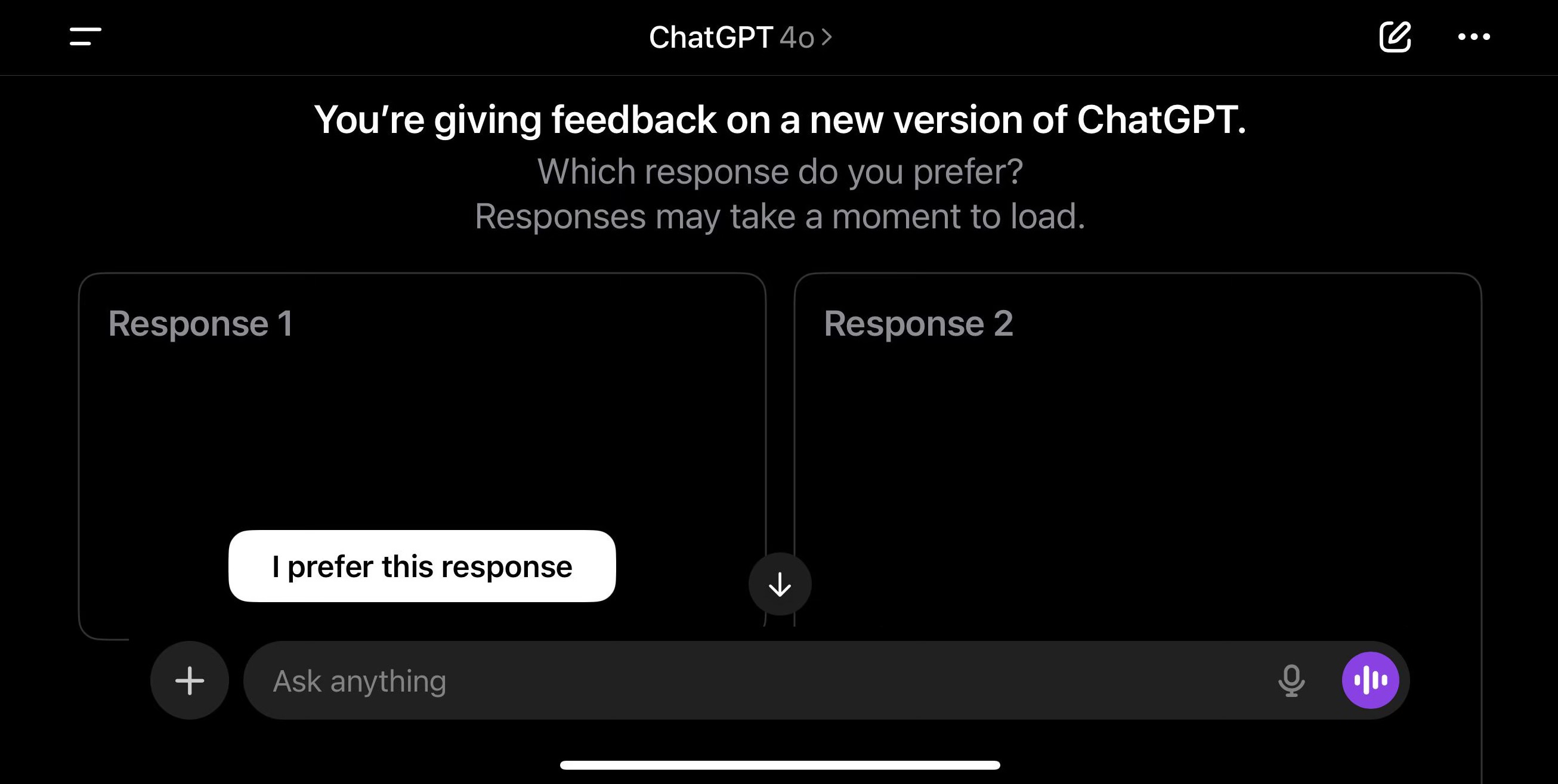
Reinforcement learning.
The feedback you design into your product literally trains the AI. Thumbs up/down, regenerate, edit, and other interactions aren’t just fun UI interactions, they’re the actions keeping the reinforcement learning loop alive.
The result:
The model starts feeling conversational and helpful. At this stage users feel its evolution from a text prediction system to something that feels like an assistant.
How would you train a custom GenAI experience?
You may be thinking “ok great Jelena, but what does that have to do with anything I might do for my clients or for the product I’m working on?”
Well, if you understand how GenAI comes to life, it’s easier for you to understand how to build a custom one. This three stage approach is a helpful approach for when you need to start ideating on what your client wants and needs.
Here’s an example that might put it into perspective.
Case Study: Building a Financial Advisor Assistant
The Business Problem:
A financial services company wants to build an AI assistant that helps financial advisors answer client questions about investment products, retirement planning, and insurance options. The assistant needs to:
Explain complex financial concepts in simple terms
Reference specific company products and policies
Follow strict compliance and regulatory requirements
Match the company’s communication style and values
Actually help advisors close more business
Stage 1: Picking an existing model
Most companies use foundation models like Open AI’s GPT or Anthropic’s Claude models as the basis for their GenAI product. In simple terms, think of it as selecting a computer software you will install on your computer (e.g. Windows 98) which comes with certain functionality out-of-the-box. Installing it allows you to use the computer and its out-of-the-box features, but you are also able to customize it by adding your images, downloading files, installing games etc.
After picking out a foundation model your system comes with these “out of the box” features:
General financial knowledge, like for example knowledge of different retirement savings accounts like a 401(k)
Ability to explain concepts clearly in natural language
Understanding of common financial scenarios and questions
Professional tone and communication skills
Knowing what you have allows you to determine what you do not have but need for your custom product. In this specific scenario, your out-of-the-box model wouldn’t have:
Knowledge of your company’s specific products
Your company compliance requirements and regulatory constraints
Your advisor workflows and internal processes
Your brand voice and communication guidelines
Recent market conditions or company-specific data
As a designer, you need to understand first what your custom chat needs to be able to do and what type of questions it should be able to answer. Then, if you understand what the foundation model can already do, you can accurately contribute to scoping what needs custom training. In this example, you don’t need to teach the model what a 401(k) is, but you do need to teach it how the company talks about 401(k)s.
Stage 2: Create the experience
At this stage you would start mapping out what the custom model needs to know. Things like:
Specific product names and features
How to position products based on client demographics
Compliance-approved language
When to offer the user next steps
Your company’s tone
You would work on defining what a good conversational experience looks like. I like to utilize service blueprints in this phase, assigning a swimlane to user intent/need, a swimlane for the actual conversational input, and then a swimlane for possible outputs from the chat. While you can’t always design responses word for word, this helps the people testing and fine-tuning the model understand what information absolutely needs to be in each response.
Things you can specify as part of the user experience:
How detailed should responses be?
What tone matches our brand?
When should the assistant ask clarifying questions vs just answer?
How do we handle topics we can’t advise on?
Does the chat provide a suggested next action?
What does “compliance-approved” language actually look like?
Stage 3: Designing the Reinforcement Learning experience
This is where your interaction design chops come in. Remember, we want to make sure the model can learn from reinforcement. This is where you account for specific UI design that consistently helps with reinforcement learning. Adding thumbs down or thumbs up by each answer, a special icon to label compliance violations… There are many ways to incorporate reinforcement feedback seamlessly into an experience.
1. Direct Feedback
You first need to determine what type of feedback the model needs. The interactions can be a general thumbs up or thumbs down, but you can also make it more nuanced:
Finding ways to label responses as “Too generic” so the model can do better in personalized responses
Labeling responses as “Too technical” so the model can learn to simplify its responses
Indicating a product suggested was wrong, so the model can learn to make better suggestions
Creating ways for users to label something as a compliance issue so the model can learn specific regulatory boundaries
2. Implicit Signals
Indirect feedback can be gathered by various user behaviors. Sometimes they’re the only feedback a system might be receiving, so designing the experience to support these types of interactions is important.
Some frequent implicit feedback includes:
User copies a response without editing it would indicate a strong positive signal
User regenerating a response multiple times indicates the model’s current approach isn’t working
User edits the response before sending it further indicates the response was close to good, but needed refinement
User immediately closes the tool/chat would indicate that the response was most likely unhelpful and has frustrated the user
3. A/B Testing
As someone that frequently answers UX questions with “it depends,” A/B testing is the best thing since sliced bread. It also allows us as designers and builders to learn what users want instead of assuming things. Some things you can test in these types of experiences:
Do users prefer bullet points or paragraphs in their responses?
Do users prefer short responses with follow-up questions or comprehensive answers?
Do users prefer product centered responses or client centered language?
Why Understanding How GenAI is Trained Matters for Design
Most designers treat generative AI as a black box. Understanding the way AI is trained and what is supported by interactions gives you a strategic advantage in the space.
1. You become aware of what can cause model failure
Understanding pre-training, fine-tuning, and RLHF limitations allows you to help bypass these limitations as much as you can with design.
2. You start to understand what feedback actually does
Understanding what the feedback does allows you to find innovative ways to collect feedback that will help the model learn, but also improve user satisfaction.
3. You understand the extent of ambiguity you can design for
Understanding that generative AI is supervised learning and reinforcement learning helps you become comfortable with designing for variability instead of the consistency we’ve been used to throughout our careers. You can also plan for the evolution and improvement of the product because you understand what that might look like.
UX Homework: Audit the User Experience of GenAI Platforms
Pick any conversational AI product like ChatGPT, Claude, Copilot, customer support bot, etc. and try to identify evidence of reinforcement learning. Look for:
Design choices that support reinforcement learning
In conversations with the product, look for clarifying questions from the chat
Note for any language that admits uncertainty
Look for instances when the product asks you to rate two different answers
Try to look at these examples and think about how you would change these design decisions, whether they’re conversational or UI.
Extra Reading

Additional Resources
NN/G — The UX of AI: Lessons from Perplexity
IBM Design on Medium — Design Principles for Generative AI Applications
Adobe Design — Designing for Generative AI Experiences
Interesting Reads from the Week
HBR — AI Doesn’t Reduce Work
Matt Shumer on X — Something Big is Happening
For questions, suggestions, collaboration, or consulting projects reach out to Jelena at hello@jelenacolak.com